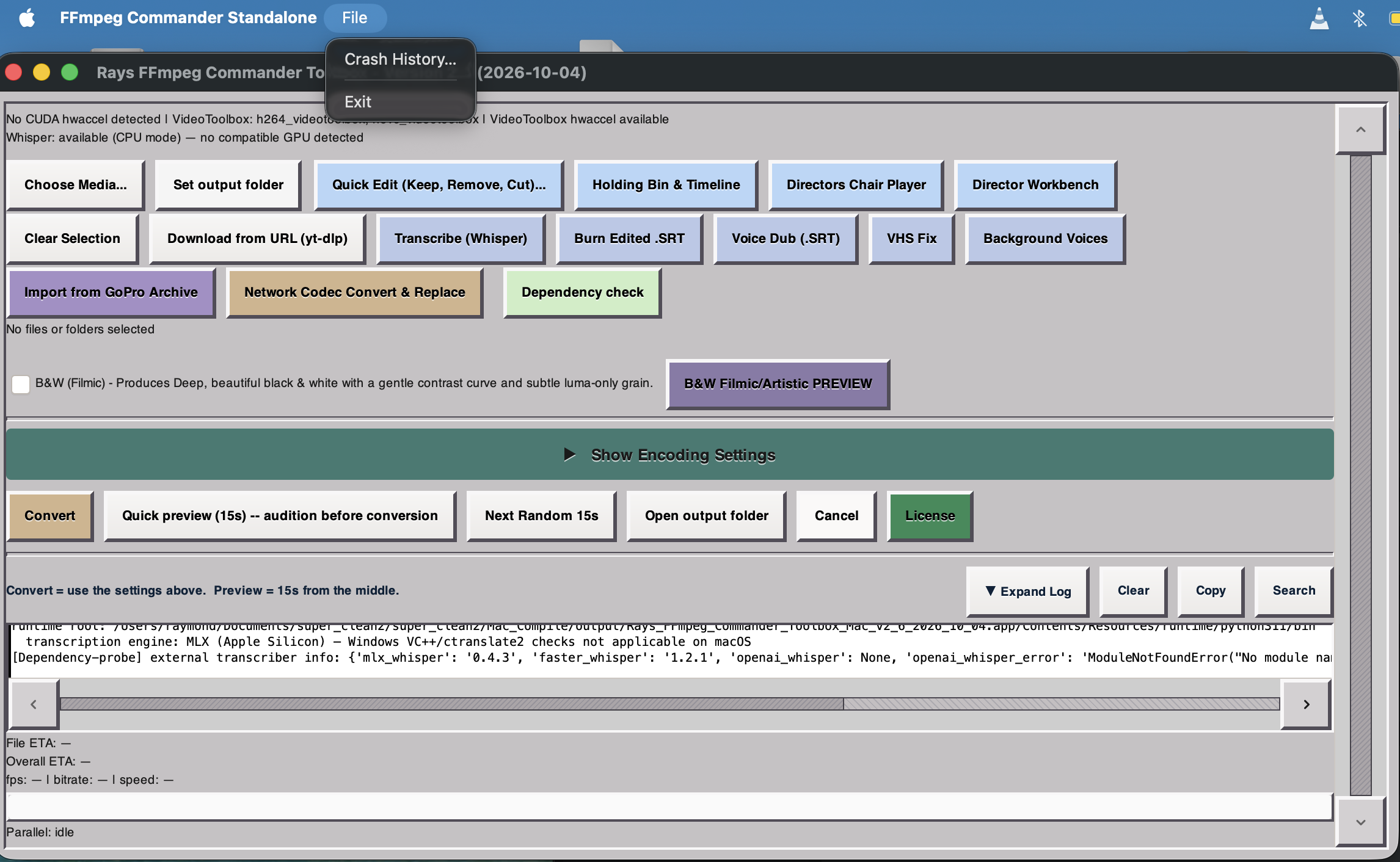
This is no longer a toy. FFmpeg Commander has been through real testing, has active Beta testers, and is in steady ongoing development. Version 2 is stable and receives small improvements regularly. Version 3 will focus entirely on expanding the effects library — the foundation is solid.
Tested in a Sandbox environment with Beta testers confirming stability. Install size is approximately 1.3 GB.
GPU-accelerated Whisper transcription uses CUDA — this requires an extra install step due to CUDA's size, but it's well worth it for speed.
Probably works on Windows 10 but that OS is no longer supported by Microsoft — you take that risk. Upgrade to Windows 11.
Minimum: Windows 11 — standard hardware.
Smaller install than Windows — no CUDA needed. Acceleration is handled by VideoToolbox, Apple's built-in low-level framework for hardware-accelerated video encoding and decoding.
VideoToolbox uses the GPU or dedicated Media Engine for fast H.264/HEVC transcoding with low CPU overhead — and it's already on your Mac. Nothing extra to install.
Minimum: Apple M1, 8 GB RAM.
One-time purchase — no subscription, no recurring fees.
Includes free updates for 1 year.
Choose your platform below. You'll receive your download link within 24 hours of purchase validation.
Single license covers both platforms — purchase the one you need now.
FFmpeg Commander was created to give you a powerful, local video toolbox that never relies on the cloud. All processing happens on your own computer, taking full advantage of your hardware acceleration and local resources — giving you 100% privacy and control over your media.
Trust is hard to come by these days — with so many privacy incidents, data leaks, and even major companies getting hacked, it's more important than ever to keep your creative work on your own machine. FFmpeg Commander never sends your files anywhere, so your projects stay yours, always.
As a proud member of Gen X, I wanted to build an interface that avoids the distracting, shiny, translucent look of many modern apps. Instead, FFmpeg Commander is inspired by the classic Solaris and Mac OS 9 operating systems, blended with my own design sensibilities — a hybrid that's clean, focused, and built for getting real work done. No gimmicks, just a professional tool for creators who value substance over flash.
A full-featured desktop application for video conversion, editing,
color grading, and creative filmmaking — powered by FFmpeg,
built with Python and GTK3.
FFmpeg is one of the most powerful media tools ever made, but its command line isn't for everyone. FFmpeg Commander wraps all of that power into a visual interface anyone can use — drag in your files, pick your settings, and go.
At its core, FFmpeg Commander takes video files in and produces converted, edited, graded, or assembled video files out. But it goes far beyond a simple converter.
Drop multiple files and convert them all at once. Choose from built-in presets like YouTube 1080p, YouTube 4K HEVC, or create your own custom presets. Hardware acceleration (VideoToolbox, NVENC) is auto-detected.

Professional audio tools built-in: loudness normalization (EBU R128), 10-band parametric EQ with visual curve display, spectral noise reduction, compression, reverb, and echo/delay. Built-in effect chain presets for podcast, broadcast, and music workflows.

Trim clips by setting start and end points — old school, pen and paper style. Adds to the Holding Bin for further editing and export. Trim the start or end of a video in a fraction of a second.

Emulate classic black-and-white film stocks — Kodak Tri-X, Ilford HP5, ORWO, and more. Real LUT-based processing with tone, contrast, and grain controls and live preview. Ever watched Jaws or The Goonies in black and white? Strip away color and your brain locks onto contrast, light, shadow, and performance differently — the same film becomes a completely new experience.

20 built-in color LUT profiles for cinematic looks. Compare LUTs side by side in a grid. Import your own .cube, .3dl, or other LUT files for custom grading.

A creative workspace that analyzes your clips and suggests creative directions. Stack timed effects — Color Drain, Speed Burst, Director's Pause — with draggable timeline regions and real-time GStreamer preview. Save entire sessions as .ffcdirector project files. Each effect is color coded so it's easy on the eyes as you scroll.

Collect clips in a visual bin, drag them into order, apply effects and transitions between clips, and render the assembled timeline as a single output file. The Holding Bin works non-destructively — all edits, audio effects, and transitions are stored as metadata and compiled into a single FFmpeg command at render time, so your source files are never modified. Language transcription is built-in at the metadata level for each clip.

Paste a YouTube, Facebook Reel, or web video URL and download it directly into your project. Supports format selection, auto-batch queuing, and custom yt-dlp presets.

Record your screen with system audio capture (BlackHole on macOS). Built-in controls for display selection, frame rate, and audio source.

Auto-discovers GoPro media on mounted volumes. Browse clips in a thumbnail grid with hover preview and import directly into your workflow.

Import videos straight from a USB-connected iPhone — no iTunes, no iCloud, no third-party sync apps. Powered by pymobiledevice3, the app talks directly to the phone over Apple's AFC protocol, grabs iOS's pre-generated thumbnails for an instant visual grid, and pulls only the clips you select.

Transcribe audio from any video using OpenAI Whisper or faster-whisper. Generates subtitles and text files with automatic language detection and word-level timestamps. CUDA hardware acceleration recently implemented — 5x–15x speed increase for Nvidia cards.

Design a text watermark once and apply it across all your exports. Supports custom fonts, position, opacity, size, shadow, and background box controls.

GStreamer-powered preview player with overlay controls, seek controls, and timeline scrubbing. Plays pre-rendered Director Workbench effect segments in real time with seamless chunk-switching. A separate timeline-aware player handles Holding Bin previews with per-clip audio effects.

Add styled text overlays to any clip — titles, lower thirds, captions, credits. Choose custom fonts, colors, sizes, positions, and timing. Stack multiple overlays per clip with independent start/end points and preview everything before rendering. Includes cinematic text effects like fade-in, typewriter, scroll, and Star Wars-style perspective crawl.

A comprehensive Command Line Log screen with useful buttons — Expand or Hide the Log, Clear, Copy, and Search. The Log shows you exactly what is happening and can be used to report any weird behavior or potential bugs.

This is where FFmpeg Commander goes beyond conversion and into creative filmmaking.
The Workbench analyzes your loaded clips — duration, scene changes, audio levels, visual content — and generates a set of creative suggestions you can render with one click. Unlike the Holding Bin (which stores edit decisions as metadata and renders them in a single FFmpeg pass at export time), the Director AI Workbench operates directly on the video: effects are pre-rendered into actual video segments and played back through GStreamer in real time, so you see exactly what the final output will look like as you drag effect regions around the timeline.
FFmpeg Commander includes a full suite of audio tools for production, podcasting, and music workflows — all available as editable processing chains inside the app.
All of these options are surfaced as sliders and presets in the GUI — no need to write FFmpeg filter chains by hand.
FFmpeg Commander is cross-platform. Hardware acceleration is auto-detected per platform:
FFmpeg Commander is a single-window GTK3 application with a modular architecture — each major feature lives in its own Python module and communicates through shared state.
Every feature — the Workbench, Holding Bin, B&W processor, screen recorder, iPhone import — is a self-contained module. This keeps the codebase organized and each component independently testable.
18 performance-critical modules are compiled from Python to native C extensions using Cython. The compiled binaries ship inside the app — no interpreter overhead on the hot paths.
Effects aren't simplified wrappers — the app builds full filter_complex pipelines with split streams, overlay compositing, geq pixel math, xfade transitions, and multi-input concat chains. What you see in the GUI maps directly to what FFmpeg executes.
Composition analysis, thumbnail generation, and multi-file operations use Python's ThreadPoolExecutor to saturate all available CPU cores. iPhone imports use asynchronous I/O over Apple's AFC protocol for non-blocking file transfers.
Built with PyInstaller into a standalone .app (macOS) and .exe (Windows). No Python installation required on the user's machine — FFmpeg and all dependencies are bundled.
The 10-band EQ curve, timeline strips, thumbnail grids, and LUT comparison views are drawn with Cairo — no pre-rendered images. Everything updates live as you adjust controls.
At 86,000+ lines of Python across 38+ source files and 18 Cython-compiled modules, it's a substantial codebase that's been iteratively built and refined over hundreds of development sessions.
Questions about FFmpeg Commander, pre-sales questions, or need help after purchase? Reach out directly — I respond personally.
FFmpeg Commander is developed by Ray Miecznik. Use the contact form below to get in touch — response is typically within 24 hours.
Send a Message →FFmpeg Commander Video Toolbox — 2026